스프링 클라우드 게이트웨이를 도입하여 프로젝트를 진행 중 인가인증 서버와 member서버의 분리를 진행하였다. 다른 서비스를 진행하는 서버들이 계속 만들어지면서 각 서버들 인가인증에 이슈들이 생기기 시작했다.
0. 현재
현재는 인가/인증 서버에서 로그인을 담당한다. 로그인에 성공하면 클라이언트에게 jwt를 발급하고, 각 서비스 서버에 요청을 할때 jwt를 전달한다. 이때 jwt의 유효성검사, decoding은 각 서버에서 맡는다.
처음 설계당시엔 인가인증 서버에서 jwt 검증을 맡게되면 모든 서버에 요청이 들어올때마다 인가인증 서버에 검증 요청이 몰리게 되고 이렇게 되면 서버를 분리한 의도가 희석이 된다고 생각을 하였고, 각 서버에서 각자 공통 password로 검증을 진행하면 인가인증 서버 하나에 많은 트래픽이 모이지 않을거라 생각을 하였다. 그러나 점점 서버가 늘어날수록 이슈들이 하나씩 늘어나기 시작했다.
먼저 동일한 코드의 중복이었다. 동일한 jwt토큰관련한 config클래스, provider가 다른 서버들에서도 똑같이 작성을 해야했고 jwt 정책이 바뀔때마다 늘어나는 서버에도 동일하게 코드를 수정해야하고 유지보수에도 어려웠다, 변경점에 대해 적용이 동일하게 되었다고 해도 휴먼에러로 여러번 고생한적도 많아서 무언가 바꿔야한다는 생각을 했다.
1.공통모듈화
앞서 작성한 글처럼 공통모듈 만들기 로 문제를 해결하자는 생각이 먼저 들었다. jwt관련을 앞에 만들어둔 공통모듈로 빼버리고 필요한 부분에서 상속받아 사용하면 되기때문에 관리포인트도 줄고 여러 장점이 많다는 생각이 들었다.
하지만 해당객체가 선언된곳은 공통모듈이지만, 결국 불러서 로직을 실행을 하고, 해당 과정이 진행이 되는곳은 각 서버단이란 사실은 변함이 없었다. 결국은 실제로 빈을 등록을 해줘야 하고, 로직들이 실제로 돌아가는곳은 엔드포인트 서버이며 정책이 변경될 경우 각 서버들을 다 수정을 해줘야 한다.
2. gateway에 넘기기.
각 서비스 서버에 접근을 하려면 클라이언트는 gateway를 무조건 거쳐야 한다. 게이트웨이를 통해서 각 엔드포인트에 접근이 가능하기도 하고, 때로는 조건을 만족하지 못하면 블락을 당한다. 그렇다면 게이트웨이에서 jwt를 검증을 하게 한다면 어떨까. 그렇게 되면 검증은 모두 한곳에서 이뤄지게 되고, 각 서비스단에선 중복으로 jwt 검증관련 코드를 가지고 있지 않아도 된다. 토큰관련 정책이 변경이 되어도 게이트웨이와 인가인증만 신경쓰면 되므로 유지보수 관점에서도 나쁘지않은 선택으로 보인다.
2-1. 초창기 검증.
처음 게이트웨이를 도입한 직후 글로벌 필터의 코드이다.
@Component
@RequiredArgsConstructor
public class JwtGlobalFilter implements GlobalFilter {
    private final JwtTokenProvider tokenProvider;
    @Override
    public Mono<Void> filter(ServerWebExchange exchange, GatewayFilterChain chain) {

        String path = exchange.getRequest().getURI().getPath();

        //로그인에 대해서는 검증생략.
        if(path.equals("/api/auth/login")) {
            return chain.filter(exchange);
        }

        HttpCookie httpCookie = exchange.getRequest()
                .getCookies()
                .getFirst("jwt");  // ← 클라이언트가 보내는 쿠키명


        if(httpCookie != null &&  tokenProvider.validateToken(httpCookie.getValue())){
            String username = tokenProvider.getUsername(httpCookie.getValue());
            tokenProvider.getUsername(httpCookie.getValue());
            exchange.getRequest().mutate()
                    .header("X-Auth-ID", username)
                    .build();

            return chain.filter(exchange);
        } else{
            exchange.getResponse().setStatusCode(HttpStatus.UNAUTHORIZED);
            return exchange.getResponse().setComplete();
        }
    }
}
우선은 시큐리티를 도입하지않고 jwt 토큰 유무와 토큰이 디코딩이 되는 정도만 검증을하고, 해당 검증이 통과가 된다면 엔드포인트를 열어주고, 엔드포인트에서 사용할 유저정보를 헤더로 내려주는 간단한 로직만 우선 적용하였다. 당장에 서비스가 복잡하진 않고 이정도만 해줘도 검증 로직은 충분하다고 생각했지만 예외 핸들링, CORS, CSRF 같은 보안 설정 일괄 관리 그리고 향후 OAuth2 도입 예정을 생각을 하니 시큐리티를 사용하는게 적합하다고 생각하게 되었다.
3. 어디까지, 어떻게 넘길까?
그렇다면 스프링 시큐리티와 글로벌 필터에 어떤 역할을 얼마나 주어야 하는지 고민이 생겼다.
우선 게이트웨이에서 수행할 역할은 다음과 같다.
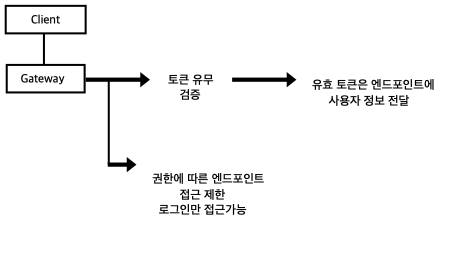
토큰 검증과 접근제한이 가장 큰 키 포인트이다. 근데 이 두가지는 사실 시큐리티와 글로벌필터의 역할이 겹친다. 게이트웨이의 GlobalFilter단에서도 토큰검증과 접근자의 path에 접근을 시켜줄지 말지, 접근범위 정책을 작성을 하고, 스프링시큐리티도 토큰 검증과 접근 범위제한의 역할을 하게되기에 서로 역할이 겹치는 상황이다. . 해당 포인트에서 고민을 많이하게 되었는데 게이트웨이의 동작 순서에 따라서 역할을 나누게 되었다. 동작 순서는 다음과 같다.
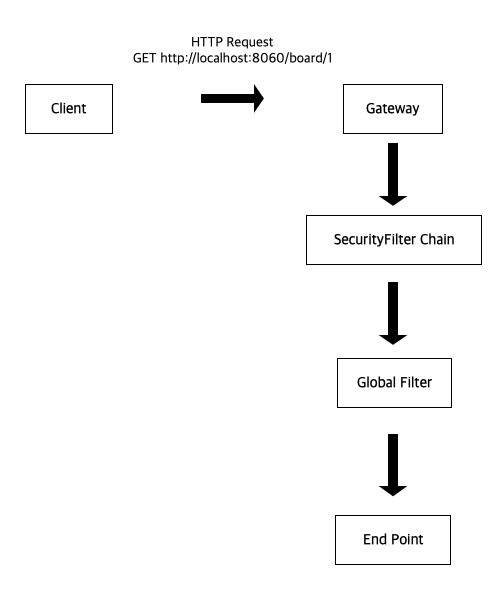
위 그림과 같이 최초 클라이언트가 http 리퀘스트를 날리게 되면, 시큐리티 필터가 작동을 한다. 시큐리티에서 설정한 uri 접근 통제 및 인가 인증이 모두 끝나게 되면 글로벌 필터가 동작을 하게 되고. 엔드포인트 접근에 대해서 통제 정책을 실행하게 조건이 충족되게 되면 최종 엔드포인트에 도달하게 된다. 시큐리티에서 인증절차를 진행하다 조건이 만족하지 않게되면 글로벌필터에 도달하기 전에 시큐리티 익셉션이 터지게 되며 글로벌 필터는 작동하지 않는다. 이 흐름대로 시큐리티에서 jwt토큰 검증과 uri접근 통제를 처리하고, 엔드포인트에 대한 정책은 글로벌필터에서 처리를 하게 된다면 각자 역할 분리가 이뤄진다.
4. 시큐리티 설정.
SecurityConfig
@Configuration
@RequiredArgsConstructor
public class SecurityConfig {
    private final WhiteListPath whiteListPath;
    private final CustomAuthenticationEntryPoint authenticationEntryPoint; // 인증 실패
    private final JwtAuthenticationManager authenticationManager;
    private final JwtSecurityContextRepository securityContextRepository;

    @Qualifier("blacklistRedisTemplate")
    private final RedisTemplate<String, Object> blacklistRedisTemplate;// 추후 설정.

    @Bean
    public SecurityWebFilterChain securityFilterChain(ServerHttpSecurity http) {
        return http
                .csrf(csrf -> csrf.disable()) // CSRF 비활성화
                .authorizeExchange(exchanges -> exchanges
                        .pathMatchers(whiteListPath.getWhiteList()).permitAll() // 화이트리스트 경로는 허용
                        .anyExchange().authenticated() // 그 외는 인증 필요
                )
                .securityContextRepository(securityContextRepository)
                .authenticationManager(authenticationManager)
                .exceptionHandling(exceptionHandlingSpec ->
                        exceptionHandlingSpec.authenticationEntryPoint(authenticationEntryPoint)
                )
                .build();
    }
}
securityWebFilterChain에서 화이트 리스트로 지정된 경로에 대해서는 토큰이 유효하지 않아도 접근이 가능하게 허용하고, 그외 경로에 대해선 유효 토큰을 제시해야 접근이 가능하게 해준다.
SecurityWebFilterChain의 구성이 평소 설정과는 조금 다른데 지금 사용하는 건 Spring Cloud Gateway + WebFlux 기반이기 때문에, ServerHttpSecurity → SecurityWebFilterChain 을 사용하는 리액티브 환경에서는 addFilterBefore(...) 사용할 수 없다.
authenticationManager(reactiveAuthenticationManager())
securityContextRepository(securityContextRepository())
이 두개를 사용하여 JWT를 해석하고 인증 객체를 생성하는 식으로 커스터마이징해줘야 한다.
토큰을 꺼내오고 검증을 진행하는 AuthenticationManager와 SecurityContextManager의 코드는 다음과 같다.
AuthenticationManager
@Component
@RequiredArgsConstructor
public class JwtAuthenticationManager implements ReactiveAuthenticationManager {

    private final JwtTokenProvider tokenProvider;

    @Override
    public Mono<Authentication> authenticate(Authentication authentication) {
        String token = authentication.getCredentials().toString();

        if (!tokenProvider.validateToken(token)) {
            return Mono.error(new BadCredentialsException("토큰이 유효하지않습니다."));
        }

        String username = tokenProvider.getUsername(token);
        String role = tokenProvider.getRole(token);

        List<GrantedAuthority> authorities = List.of(new SimpleGrantedAuthority(role));
        return Mono.just(new UsernamePasswordAuthenticationToken(username, null, authorities));
    }
}
SecurityContextManager
@Component
@RequiredArgsConstructor
public class JwtSecurityContextRepository implements ServerSecurityContextRepository {

    private final JwtAuthenticationManager authenticationManager;

    @Override
    public Mono<SecurityContext> load(ServerWebExchange exchange) {
        String token = extractToken(exchange);
        if (token == null) return Mono.empty();

        Authentication auth = new UsernamePasswordAuthenticationToken(null, token);
        return authenticationManager.authenticate(auth).map(SecurityContextImpl::new);
    }

    @Override
    public Mono<Void> save(ServerWebExchange exchange, SecurityContext context) {
        return Mono.empty(); // Stateless 처리
    }

    private String extractToken(ServerWebExchange exchange) {
        return Optional.ofNullable(
                exchange.getRequest().getCookies().getFirst("jwt")
        ).map(HttpCookie::getValue).orElse(null);
    }
}
이렇게 하면 시큐리티에서 해야할 토큰검증과 권한 확인 절차에 대해선 완료가 되었다. 다음은 각 엔드포인트에 대한 정책 설정을 해주는 GlobalFilter에 대해서 설정이 필요하다.
GlobalFilter
@Component
@RequiredArgsConstructor
public class JwtGlobalFilter implements GlobalFilter {
    private final JwtTokenProvider tokenProvider;
    private final WhiteListPath whiteListPath;

    @Override
    public Mono<Void> filter(ServerWebExchange exchange, GatewayFilterChain chain) {

        String path = exchange.getRequest().getURI().getRawPath();

           /*
            * 게이트웨이서  이미 분기가 된 이후기때문에 Predicate가 제거된 whiteListPath를 사용.
            * ex /users/api/auth/login -> /api/auth/login
            * */
        if (Arrays.stream(whiteListPath.getStrippedWhiteList()).anyMatch(path::matches)) {
            return chain.filter(exchange);
        }

        HttpCookie httpCookie = extractToken(exchange);

        if(httpCookie != null &&  tokenProvider.validateToken(httpCookie.getValue())){
            String username = tokenProvider.getUsername(httpCookie.getValue());
            String role = tokenProvider.getRole(httpCookie.getValue());

             ServerWebExchange updatedExchange = exchange.mutate()
                    .request(
                            exchange.getRequest().mutate()
                                    .header("X-Auth-ID", username)
                                    .header("X-Auth-Role", role)
                                    .build()
                    ).build();

            return chain.filter(updatedExchange);


        } else{
            exchange.getResponse().setStatusCode(HttpStatus.UNAUTHORIZED);
            return exchange.getResponse().setComplete();
        }
    }

    private HttpCookie extractToken(ServerWebExchange exchange) {
        return exchange.getRequest()
                .getCookies()
                .getFirst("jwt"); // ← "jwt"는 쿠키 이름
    }
}
(whiteListPath에 대한 내용은 밑에서 추가로 설명)
GlobalFilter에선 토큰에 대해서 검증을 진행을 따로 하지는 않고 엔드포인트에서 필요한 사용자 정보만 내려주는 정도만 진행해준다.
앞에서 SecurityFilterChain에서 토큰에 대한 검증은 이미 되었고, 검증에 문제가 있으면 이미 예외를 던지기 때문에 GlobalFilter까지온 토큰은 검증을 하지 않는다. 현재 화이트리스트로 지정된 경로와 그외 경로, 그리고 그 외 경로에 대한 권한별 접근은 아직 정책이 나오지 않아 자세하게 설정은 하지 않았다. 추후 관리자권한, 일반권한에 대해서 자세한 정책이 나온다면 추후 적용하는걸로 한다.
현재 화이트리스트(모든 사용자에 대해 접근허용)로 지정된 경로는 로그인 페이지 하나이고 해당 경로는 헤더에 유저정보를 내려줄 필요가 없기에 바로 엔드포인트에 접근을 허용한다. 그 외 경로에 대해서는 헤더에 username과 권한을 넘겨주어 엔드포인트 동작에 필요한 기본정보를 제공한다.(그외 정보는 엔드포인트에서 API 통신으로 요청)
WhiteListPath
@Component
@Getter
public class WhiteListPath {

    public final String[] whiteList = {
            "/users/api/auth/login",
    };

    // StripPrefix 이후 기준 (GlobalFilter용)
    private final String[] strippedWhiteList = Arrays.stream(whiteList)
            .map(path -> path.replaceFirst("^/[^/]+", ""))
            .toArray(String[]::new);
}
SecurityFilterChain에서는 whiteList.getWhiteList()를 사용하는데 GlobalFilter에서는 whiteList.getStrripedWhiteList를 사용을 하는 이유는 다음과같다.
SecurityFilterChain에 도착한 최초 paht는 SpringCloudGateway의 application.yml에서 설정한 predicate를 달고있는 경로이다.
최초 클라이언트가 http://localhost:8060/users/api/auth/login으로 게이트웨이에 접근을 했다고 가정하면 securityFilterChain은
/users/api/auth/login을 경로로 인식한다. 반면 securityFilterChain을 통과한 이후엔 게이트웨이에서 이미 경로의 분기가 끝난 상태기 때문에 predicate가 빠진 /api/auth/login 을 경로로 인식한다. 현재 정책이 시큐리티와 globalFilter의 화이트리스트가 같기 때문에 경로를 다르게 인식하는 두 곳에서 모두 사용하기 위해서 "/users"를 제거한 strippedWhiteLsit를 사용한다.
5. 엔드포인트에서의 헤더 확인
테스트를 위하여 게시판 서버에 실제 헤더값이 어떻게 찍히는지 확인을 해보고자 한다.
먼저 findOne 메서드에 @RequestHeader Map<String, String> headers 를 추가하고, 게이트웨이에서 넣어주는 헤더를 실제로 받아오는지 println()으로 찍어보자
 @GetMapping("/community/{id}")
    public ResponseEntity<CommunityResponse> findOne(@CookieValue(value = "jwt", required = false) String token,
                                                     @RequestHeader Map<String, String> headers,
                                                     @PathVariable Long id) {
        CommunityResponse one = communityService.findOne(id);
        headers.forEach((k, v) -> System.out.println(k + " : " + v));
        return ResponseEntity
                .ok()
                .body(one);
    }
우선 컨트롤러에 위와같이 작성을 해주고
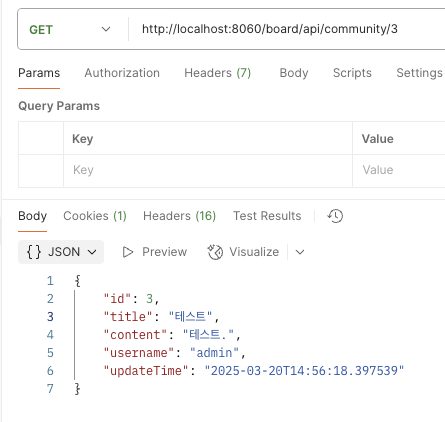
포스트맨으로 게이트웨이에 3번 게시글 조회 요청을 날려본다. 우선 에러는 없이 ResponseEntity는 잘 뱉어내는 모습.
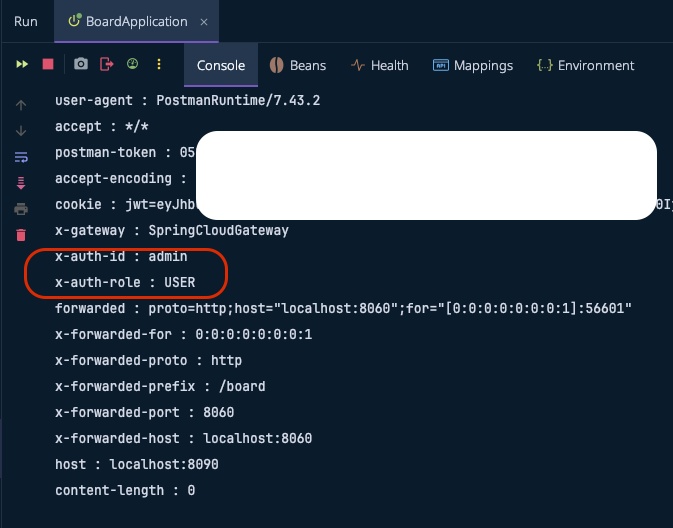
게시판 서버의 콘솔을 확인해보면 빨간색 동그라미에 보이듯 헤더에 우리가 넣어준 x-auth-id, x-auth-role이 잘 찍히는 모습이다.
이제 엔드포인트에서는 해당 헤더로 필요한 작업을 진행하면 된다.